
Theteller API Documentation
Overview
To start integrating with the Theteller API, you need a Theteller merchant account. See how to set up here: Setting up on Theteller. Short answers to common questions are in the FAQ.
Theteller API helps you create payment flows for payment acceptance and e-commerce.

On your website
Charge your customers' mobile money wallets directly from your website through our API
View Guide
Payment Links
Send customers a link to pay by card or mobile money on our secure checkout page
View Guide
API base URL: https://www.thetellerpay.net
Current mode: Test (simulated payments, no real money)
Setting up an Account on Theteller
Setting up a merchant account is as easy as possible, simply Signup Here. When you complete the sign-up form your account is created and you are taken to your merchant dashboard.
Test Credentials
Your API credentials are created when you sign up: a Merchant ID (for example TTM-48213095), an API Username, and two API Keys: a test key and a production key. Each key is 48 characters long, starts with TTK- and ends with =; copy all of it, including TTK-. Payments made with the test key are test payments, so you can build and try your integration without real money, even while your account waits for approval. You can find your credentials under My Account on your merchant dashboard; each API Key is shown once, and you can regenerate it at any time.
Live Credentials
To take real payments, use the production API key with the same API Username: it works once your account has been approved. Contact Support
Adding Theteller to your website
There are two ways to take payments:
- The API, for your website or app: your server sends the customer's mobile money number and network, and we send a prompt to their phone to approve the payment with their PIN. There is no checkout page. See Mobile Money Payments.
- Payment links, made on your dashboard: the customer opens the link and pays by card or mobile money on our secure checkout page. See Payment Links.
- Your server calls
POST /v1.1/transaction/processwith the amount, your own 12-digit transaction ID, the customer's network and their wallet number. - The customer gets a prompt on their phone and enters their mobile money PIN.
- Your server checks
GET /v1.1/users/transactions/{transaction_id}/statusuntil the result is final, and fulfils the order when the code is000.
Call the API from your server, not from the browser
The API only answers requests from your server (PHP, Node.js, Python, Java, C#...). Requests made with JavaScript inside a web page are blocked by the browser (the API does not accept cross-origin requests), and they would show your API key to everyone who opens the page. Your page sends the customer's network and number to your own server, and your server calls the API: the complete website example does exactly that and can be copied as it is.
Mobile Money Payments (API)
Theteller API processes mobile money from MTN, Telecel (Vodafone), AirtelTigo, Zeepay and G-Money directly: your server asks for the payment, we send the prompt to the customer's phone, and they approve it with their PIN. No checkout page is involved.
Endpoint: https://www.thetellerpay.net/v1.1/transaction/process
Step 1: Collect the payment details.
Ask the customer for their network and mobile money number, then send the following as a JSON payload.
| Parameter | Required | Data Type | Description |
|---|---|---|---|
| merchant_id | true | string | Your merchant ID, shown on your dashboard. |
| transaction_id | true | string | Unique transaction reference provided by you. Must be 12 digits. |
| amount | true | string | Amount to charge as 12 digits in pesewas, e.g. 000000000100 for GHS 1.00. |
| processing_code | true | string | 000200 for a mobile money payment. |
| r-switch | true | string | The customer's network: MTN, VDF (Telecel/Vodafone Cash), ATL (Airtel), TGO (Tigo), ZPY (Zeepay) or GMY (G-Money). |
| desc | true | string | Text to be displayed as a short transaction narration (max 100 characters). |
| subscriber_number | true | string | The mobile money wallet to charge, e.g. 233244123456 or 0244123456. |
| customer_email | false | string | The customer's email, shown with the payment on your dashboard. |
Authenticate with HTTP Basic auth (RFC 7617), using the API Username and API Key from your dashboard: Authorization: Basic base64_encode('API username:API key').
Use a new transaction_id for every payment: sending one you have used before is refused with code 909. The samples below make a random one each time; save it with the order, as you check the payment with it.
Step 2: Send the payment request.
Each sample is a complete program: put your API Username, API Key and Merchant ID at the top and run it on your server.
Method: POST
Endpoint: https://www.thetellerpay.net/v1.1/transaction/process

// Request Headers
Content-Type: application/json
Authorization: Basic base64_encode('your API username:your API key')
Cache-Control: no-cache

// Request Body
{
  "amount": "000000000100",
  "processing_code": "000200",
  "transaction_id": "000000000001",
  "desc": "Mobile Money Payment",
  "merchant_id": "Your merchant ID",
  "subscriber_number": "233244123456",
  "r-switch": "MTN"
}

// transaction_id: a new 12-digit number for every payment
// amount: 12 digits in pesewas (000000000100 = GHS 1.00)
Sample Response
{
  "code": "111",
  "status": "pending",
  "reason": "Payment request sent successfully",
  "transaction_id": "000000000001",
  "r_switch": "MTN",
  "subscriber_number": "233****456",
  "amount": 1,
  "currency": "GHS"
}
Code 111 means the prompt is on the customer's phone. When they approve it the payment becomes 000 (approved); a wrong PIN, no answer or not enough money ends it with a failure code. A response can also come back already final.
Response time: this request answers within about 10 seconds: with the result if it is already known, otherwise with 111. Allow at least 30 seconds before your HTTP client gives up.
The PIN prompt expires quickly. Customers have only a short time to enter their PIN: on Telecel Cash about 15 seconds, and not much longer on other networks. Tell customers to keep their phone unlocked and approve as soon as it rings. An expired prompt ends the payment with 103 (wrong PIN or timed out); start a new payment with a new transaction_id.
Always check the result. Check the payment with the status endpoint every few seconds until the code is final, and only fulfil the order when it is 000 and the amount matches.
Card payments
Card details must not pass through your server (the card industry's PCI DSS standard sets strict rules for every system that handles them), so cards are not taken through the API. To take a card payment, send the customer a payment link: they enter their card on the secure checkout page.
Checking payment response / verifying transaction.
Endpoint: https://www.thetellerpay.net/v1.1/users/transactions/{transaction_id}/status
Check the status of a payment using your transaction ID, with your Merchant ID in the Merchant-Id header and your API credentials in the Authorization header. A mobile money payment is final once the customer has answered the prompt or it has expired, usually within a minute. In the example below we show a code snippet to check transaction status.
Method: GET
Endpoint: https://www.thetellerpay.net/v1.1/users/transactions/{transaction_id}/status

// Request Headers
Authorization: Basic base64_encode('your API username:your API key')
Merchant-Id: Your merchant ID
Cache-Control: no-cache
Sample Response
{
  "code": "000",
  "status": "approved",
  "reason": "Transaction successful",
  "transaction_id": "000000000001",
  "r_switch": "MTN",
  "subscriber_number": "233****456",
  "amount": 1,
  "currency": "GHS"
}
Possible status values: pending (waiting for the customer), approved, declined, and for payment links also initiated (not paid yet), vbv_required and cancelled.
failed is not a payment result: it means the request itself was refused, for example 979 (wrong API credentials), 600/999 (Merchant ID) or 404 (no payment with this transaction_id for these credentials: check the ID, and that you use the same key, test or production, that made the payment). Fix the request and ask again; do not mark the customer's payment as failed because of it.
Complete Website Example
A whole mobile money payment page for your website, ready to copy: the customer picks their network and enters their number, gets the prompt on their phone, and the page shows the result as soon as they approve it. It has two parts in one file:
- The page the customer sees, with the payment form. Its JavaScript only talks to your own server.
- Your server side, which keeps your API key, starts the payment with
POST /v1.1/transaction/processand checks it with the status endpoint every 5 seconds.
Put your API Username, API Key and Merchant ID at the top. For PHP, upload the file as pay.php to any PHP host and open it in the browser. Then set the amount from your order and, where the comments say so, save the transaction ID with the order and mark the order paid when the code is 000.
<?php
// pay.php: upload this one file to your website (PHP 7.4+ with curl) and open it in the browser.
// The API is called from here, on your server, so the API key is never sent to the customer's browser.
$apiUsername = "YOUR_API_USERNAME";
$apiKey      = "YOUR_API_KEY";
$merchantId  = "YOUR_MERCHANT_ID";
$apiBase     = "https://www.thetellerpay.net";

// The amount comes from your order, never from the form (a customer could change it)
$orderAmountGhs = 1.00;
$orderDesc      = "Order 1001";

function callApi($method, $path, $body = null) {
    global $apiUsername, $apiKey, $merchantId, $apiBase;
    $curl = curl_init($apiBase . $path);
    curl_setopt_array($curl, [
        CURLOPT_RETURNTRANSFER => true,
        CURLOPT_TIMEOUT        => 60,
        CURLOPT_CUSTOMREQUEST  => $method,
        CURLOPT_USERPWD        => $apiUsername . ":" . $apiKey,
        CURLOPT_HTTPHEADER     => ["Content-Type: application/json", "Merchant-Id: " . $merchantId, "Cache-Control: no-cache"],
    ]);
    if ($body !== null) curl_setopt($curl, CURLOPT_POSTFIELDS, json_encode($body));
    $response = curl_exec($curl);
    $error = curl_error($curl);
    if ($response === false) return ["code" => "500", "status" => "failed", "reason" => "Could not reach the payment API: " . $error];
    return json_decode($response, true) ?: ["code" => "500", "status" => "failed", "reason" => "Unexpected reply from the payment API"];
}

// Start the payment: the customer gets a prompt on their phone
if ($_SERVER["REQUEST_METHOD"] === "POST") {
    header("Content-Type: application/json");
    $transactionId = (string) random_int(100000000000, 999999999999);
    // Save $transactionId with your order here, to know which order it pays for
    $reply = callApi("POST", "/v1.1/transaction/process", [
        "amount"            => sprintf("%012d", round($orderAmountGhs * 100)),
        "processing_code"   => "000200",
        "transaction_id"    => $transactionId,
        "desc"              => $orderDesc,
        "merchant_id"       => $merchantId,
        "subscriber_number" => $_POST["number"] ?? "",
        "r-switch"          => $_POST["network"] ?? "",
    ]);
    echo json_encode(["transaction_id" => $transactionId] + $reply);
    exit;
}

// Check the payment (the page calls this every 5 seconds)
if (isset($_GET["check"])) {
    header("Content-Type: application/json");
    $id = preg_replace("/\\D/", "", $_GET["check"]);
    $status = callApi("GET", "/v1.1/users/transactions/" . $id . "/status");
    // When $status["code"] is "000" the payment is approved: mark the order with this transaction ID as paid
    echo json_encode($status);
    exit;
}
?>
<!doctype html>
<html>
<head><meta charset="utf-8"><meta name="viewport" content="width=device-width, initial-scale=1"><title>Pay with Mobile Money</title></head>
<body style="font-family: sans-serif; max-width: 420px; margin: 40px auto; padding: 0 16px">
  <h2>Pay GHS <?= number_format($orderAmountGhs, 2) ?></h2>
  <form id="pay">
    <p><label>Network<br>
      <select name="network" required>
        <option value="MTN">MTN Mobile Money</option>
        <option value="VDF">Telecel Cash</option>
        <option value="ATL">AirtelTigo Money</option>
        <option value="GMY">G-Money</option>
        <option value="ZPY">Zeepay</option>
      </select></label></p>
    <p><label>Mobile money number<br><input name="number" placeholder="0244123456" required></label></p>
    <button type="submit">Pay now</button>
  </form>
  <p id="message"></p>
  <script>
    var form = document.getElementById("pay");
    var message = document.getElementById("message");
    form.addEventListener("submit", function (e) {
      e.preventDefault();
      form.querySelector("button").disabled = true;
      message.textContent = "Sending the payment request...";
      fetch("pay.php", { method: "POST", body: new FormData(form) })
        .then(function (r) { return r.json(); })
        .then(function (data) { show(data); if (data.status === "pending") wait(data.transaction_id, 0); });
    });
    function wait(id, tries) {
      if (tries >= 36) { message.textContent = "No answer from your phone. Please try again."; form.querySelector("button").disabled = false; return; }
      setTimeout(function () {
        fetch("pay.php?check=" + id)
          .then(function (r) { return r.json(); })
          .then(function (data) { if (data.status === "pending") { wait(id, tries + 1); } else { show(data); } })
          .catch(function () { wait(id, tries + 1); });
      }, 5000);
    }
    function show(data) {
      if (data.code === "000") message.textContent = "Payment successful. Thank you!";
      else if (data.status === "pending") message.textContent = "Approve the payment on your phone with your mobile money PIN.";
      else { message.textContent = "Payment failed: " + data.reason; form.querySelector("button").disabled = false; }
    }
  </script>
</body>
</html>
Try it first with your test API key: no money moves, and the test numbers let you see an approved and a declined payment. Switch to the production key to take real payments.
Payment Links
Create a payment link on your dashboard under Payment Links and send it to your customer by SMS, WhatsApp or email. They open it and pay by card or mobile money on our secure checkout page, and the result appears on your dashboard. Payment links are the only payments that use the checkout page; card details never touch your servers.
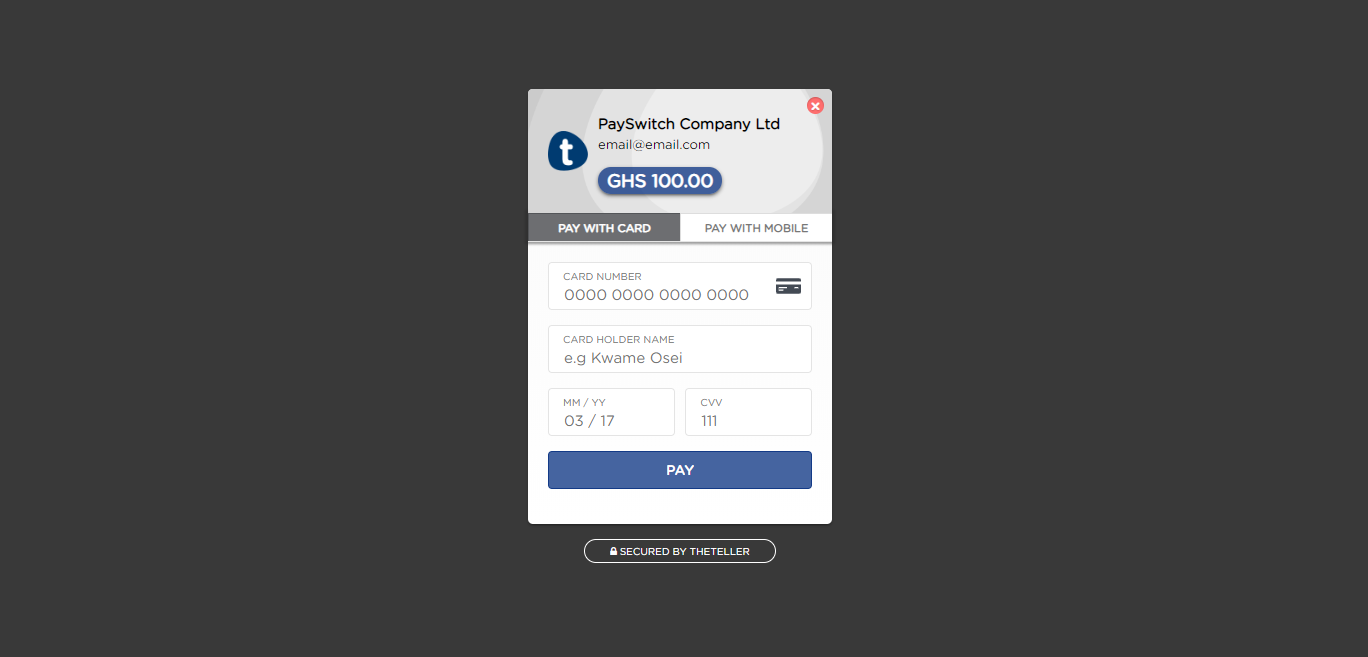
How the Theteller payment page looks
Cards and Mobile Money
The checkout page (payment links) accepts Visa and Mastercard cards and the mobile money networks below; the API takes the mobile money networks, with the code as r-switch. The r_switch field in the status response tells you which was used.
| r_switch | Payment method |
|---|---|
| VIS | Visa |
| MAS | Mastercard |
| MTN | MTN Mobile Money |
| VDF | Telecel Cash (formerly Vodafone Cash) |
| ATL / TGO | AirtelTigo Money |
| ZPY | Zeepay |
| GMY | G-Money |
Handling VBV
Some cards require Verified by Visa / 3-D Secure. The checkout page handles this for you by asking the customer for a one-time code before the payment is approved.
Test Cards
Use these in test mode. Any future expiry date and any 3-digit CVV are accepted.
No VBV
4448366600675430
Approved immediately
VBV Enabled
4012001037141112
OTP 123456 approves; any other code declines
VBV Enabled
4111111111111111
OTP 123456 approves
Declined
Any other valid card
Declined with code 104
Test Mobile Money
In test mode, and with your test API key, any network and any mobile money number (e.g. 0240000000 or 233240000000) can be used. The last digit decides the outcome:
| Number ends in | Outcome |
|---|---|
| …1 | Declined: insufficient funds (101) |
| …2 | Declined: number not registered (102) |
| …3 | Declined: wrong PIN or timed out (103) |
| any other | Prompt sent (111), then approved (000) about 5 seconds later |
API Keys
Theteller authenticates your API requests using your account's API Username and API Key. If you do not include them, or use an incorrect or outdated key, Theteller returns error code 979. To get API keys you need to sign up here.
Obtaining your API Keys
Your Merchant ID and API Username are available in the Dashboard under My Account. For security the API key itself is only displayed once, right after sign up or after you regenerate it.
API Keys start with TTK-, so you can recognise them, and spot one quickly if it is ever pasted somewhere it should not be.
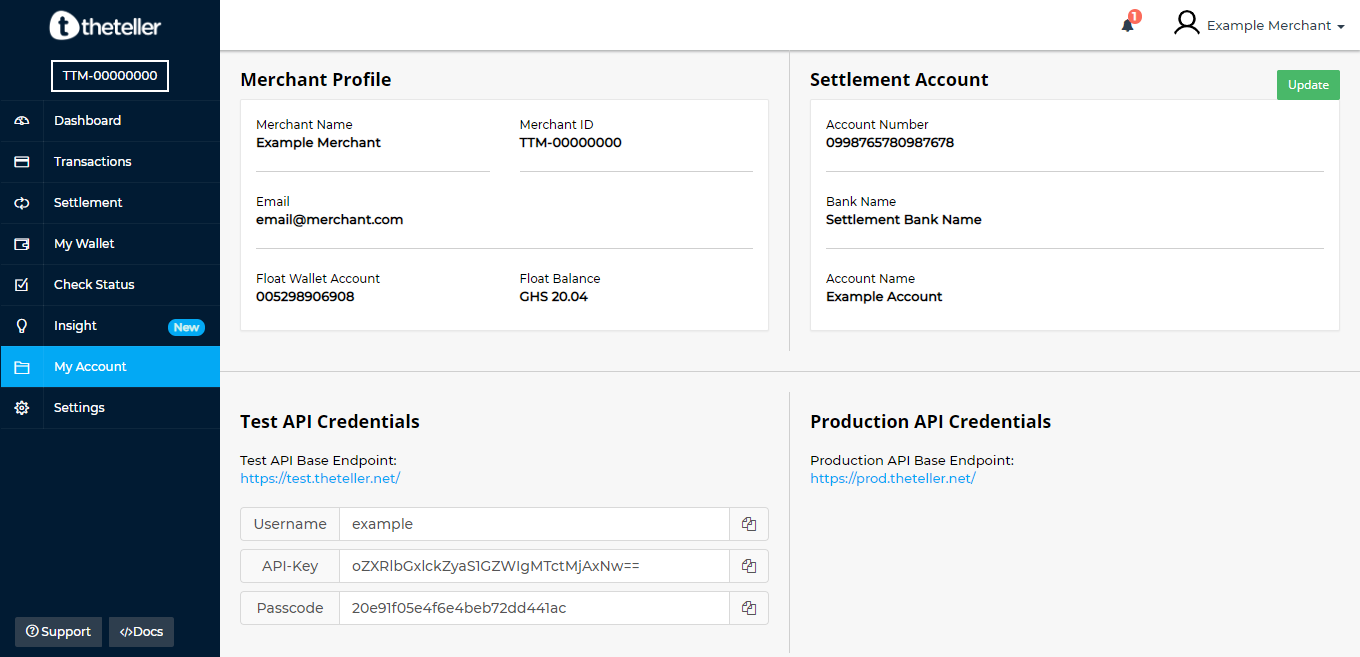
Keep your API key on your server, for example in an environment variable. Never put it in website JavaScript or mobile app code.
Test and production keys
Payments made with your test API key are test payments: no money moves, and only the test cards and test numbers produce predictable results. Payments made with your production API key are real once live payments are on and your account has been approved. Both keys use the same addresses and the same API Username. Test and production payments have separate transaction IDs, so you can use your test IDs again when you go live.
Plugins
Official e-commerce plugins (WooCommerce, Magento, OpenCart) and mobile SDKs are not published yet. Every platform can integrate today with the REST API above, using the code samples for PHP, Node.js, Python, C# and Java.
If you have built a plugin and would like it listed here, or need help integrating, contact ps_dev@payswitch.com.gh.
Theteller Response Codes
| Code | Reason |
|---|---|
| 000 | Transaction successful |
| 100 | Transaction Failed or Declined |
| 101 | Insufficient funds in wallet |
| 102 | Number not registered for mobile money |
| 103 | Wrong PIN or transaction timed out |
| 104 | Transaction declined or terminated |
| 105 | Invalid request or general failure (the reason field explains what is wrong) |
| 111 | Payment request sent successfully (awaiting customer approval) |
| 200 | VBV Required |
| 404 | Transaction not found |
| 600 | Access Denied (merchant ID does not match your credentials) |
| 909 | Duplicate Transaction ID. Transaction ID must be unique |
| 979 | Access Denied. Invalid Credential |
| 999 | Access Denied. Merchant ID is not set |
Common Errors
| What you see | Cause and fix |
|---|---|
Code 909 Duplicate Transaction ID | The transaction_id was used before. Make a new 12-digit one for every payment, as the samples do. |
Code 979 Invalid Credential | The API Username or API Key is wrong, has a space in it, is missing the TTK- at the start, or the key was regenerated. Copy both again from My Account (regenerate the key if you no longer have it). |
Code 600 Access Denied | merchant_id (or the Merchant-Id header) is not the Merchant ID of these credentials (reason "merchant_id does not match your API credentials"), or the production key is used before your account is approved (reason "This merchant account is waiting for approval"; the test key works meanwhile). Your account's status is shown on your dashboard. |
Code 105 with a reason | A field is missing or in the wrong format: the reason names it. amount must be 12 digits in pesewas (000000000100 for GHS 1.00), processing_code 000200, subscriber_number a number like 0244123456. |
| "Failed to fetch" or a CORS error in the browser console | The API was called from JavaScript in a web page. Call it from your server instead: see the complete website example. |
| An HTML page or "Redirecting..." instead of JSON | The address is not exactly https://www.thetellerpay.net (for example without www, or with http://). Copy the endpoint from this page. |
Code 103 straight after the prompt | The prompt expired before the customer entered their PIN (on Telecel Cash it lasts about 15 seconds). Start a new payment with a new transaction_id and ask the customer to approve as soon as the phone rings. |
| The customer gets no prompt | With the test key no prompt is sent (test payments are simulated): use the production key for real customers. With the production key, check the network (r-switch) matches the customer's number. |
Status stays pending | The customer has not answered the prompt yet. Keep checking every few seconds (the samples check for 3 minutes); if they never answer, start a new payment with a new transaction_id. |
More answers, from API keys to payouts, are in the Frequently Asked Questions. Still stuck? Contact support.